
Cloudbeds Integration
Hello Hotel® connects directly with Cloudbeds to bring your guest and reservation data into every call and text. Your team sees who’s on the line, their room, and their stay dates without opening another tab.

The Hello Hotel + Cloudbeds integration puts each guest’s stay on every call and text, and writes your updates back to Cloudbeds.
- Every call and text is matched to the guest’s Cloudbeds reservation, so your team sees who’s calling, their room, and their stay dates before they pick up.
- Contact edits, reservation notes, and guest notes write back to Cloudbeds, and duplicate guests merge in both systems.
- Automations run on your Cloudbeds reservations, with payment links and door codes filled in for you.
- AI answers availability questions with your Cloudbeds rates and a link to book, as a draft for your team in the inbox and directly in web chat.
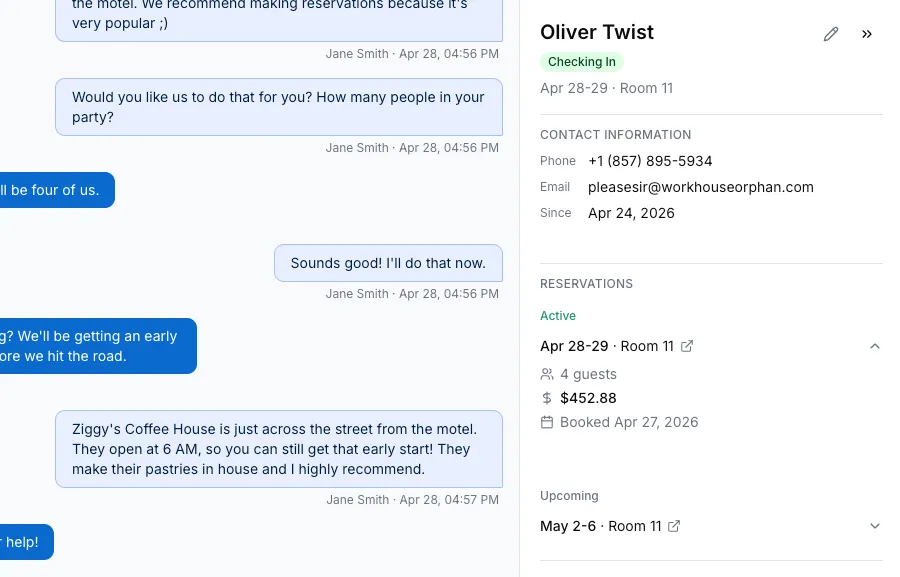
When a guest calls or texts your hotel, Hello Hotel matches them to their Cloudbeds reservation by phone number. Your team sees the guest’s name, stay dates, room, and status alongside the conversation before anyone picks up.
Connect Cloudbeds in a few minutes
Sign in to Cloudbeds from your Hello Hotel integration settings, or install Hello Hotel from the Cloudbeds Marketplace and choose which organization to connect. There are no API keys to paste and no developer to call.
Once you’re connected, Hello Hotel imports your reservations up to two years ahead, including bookings made before you connected, so guest identification and pre-arrival automations work for them from the first day. Those earlier bookings don’t set off new-booking messages. Step-by-step setup is in Connecting Cloudbeds.
Live reservation context in every conversation
Stay dates, room, status, the reservation amount, and the date it was booked appear right in the conversation. The booking source shows the channel behind it, such as “Cloudbeds (Booking.com)”, and every reservation card links straight to the booking in Cloudbeds. When a guest asks about their dates or their balance, your team has the answer without putting anyone on hold.
Guest status that keeps itself current
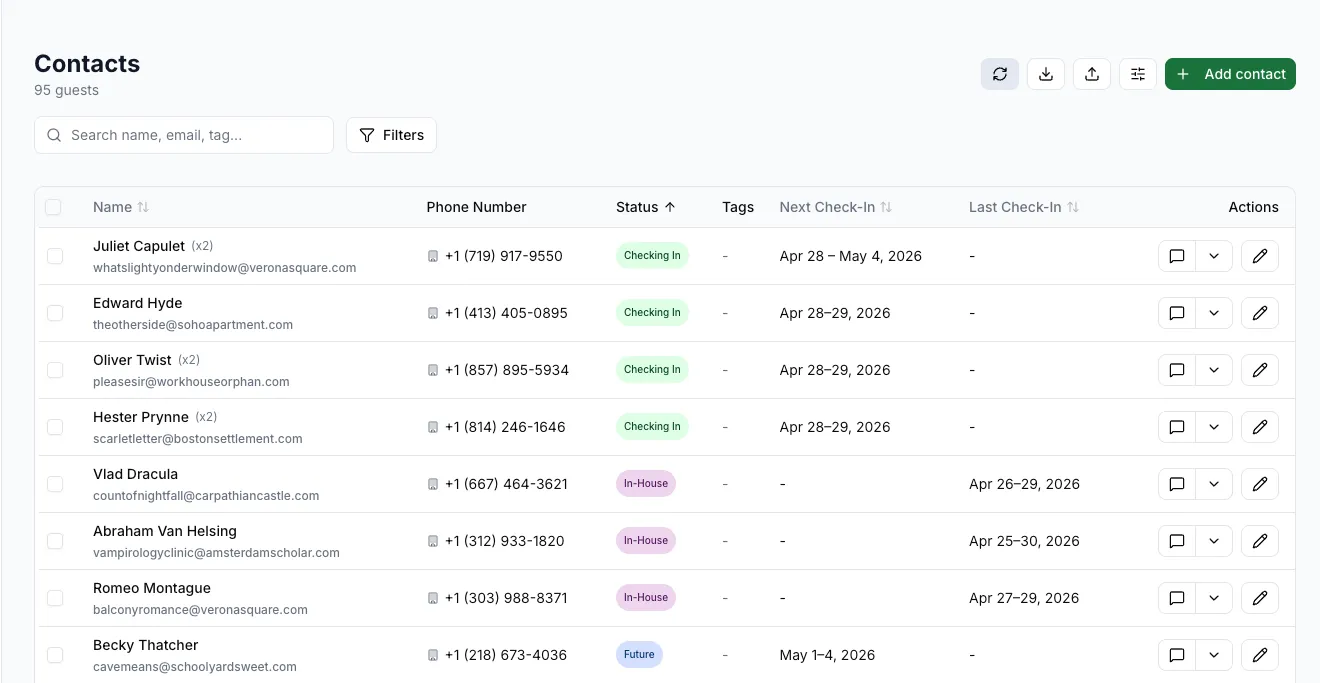
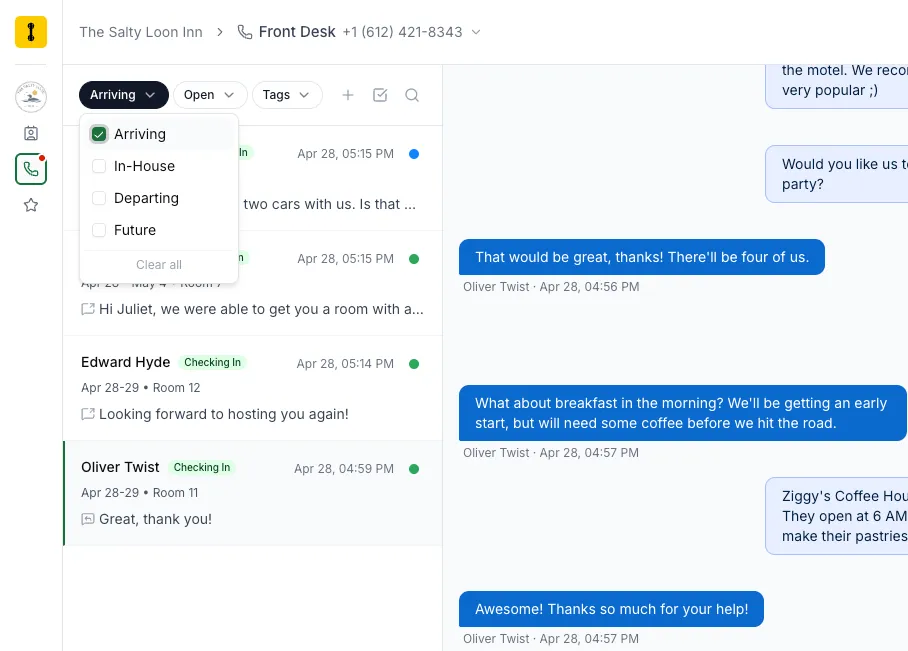
Every guest carries a status worked out from their Cloudbeds reservation: Future, Checking In, Checked In, In House, Checking Out, Checked Out, or Past. Status follows your property’s own calendar day, so a guest leaving today shows as Checking Out from the morning. Your team can filter the inbox to Arriving, In-House, Departing, Future, or Past guests, which makes a busy check-out morning much easier to work through.
Returning guests, recognized
Guests who have stayed before are flagged with their stay count, so your team can greet a regular like one.
Contact edits and notes write back
Edit a guest’s name, email, or phone in Hello Hotel and the change goes to their Cloudbeds guest profile, and changes made in Cloudbeds flow back into Hello Hotel. Reservation notes can be added, edited, and deleted from Hello Hotel, and guest notes you add are written to Cloudbeds too. Notes written in Hello Hotel show up in Cloudbeds with the writer’s name in front, so everyone knows who left them.
Duplicate guests, merged in both systems
When two contacts share a phone number or look like the same person, Hello Hotel flags them for your team. Merge them in Hello Hotel and the merge is applied in Cloudbeds as well, with the conversation history moving to the guest who remains. A merge made directly in Cloudbeds brings the history across in Hello Hotel too. When a phone number changes hands between guests, Hello Hotel moves it to the guest on the new reservation before any automated message goes out.
Automations that run on Cloudbeds data
Trigger messages from a new reservation, a change in reservation status, or an upcoming check-in or check-out. The Room condition checks the Cloudbeds housekeeping board at the moment it runs, so a workflow can send a “your room is ready” text only when the room is clean. Guest names, room names, stay dates, and the booking source fill into messages, snippets, and automations on their own.
Payment links, check-in links, and door codes
A payment link creates a Cloudbeds pay-by-link for the reservation’s outstanding balance when the message sends, and it stays valid for 30 days. If you use the Cloudbeds Guest Experience module, turn on Guest Experience check-in links in Hello Hotel to send each guest their check-in link, and the online check-in completed trigger then works on your Cloudbeds reservations.
Door codes come from a field on the Cloudbeds reservation that you choose, and they drop into your check-in texts automatically. With RemoteLock connected, Hello Hotel also checks each code against the stay and shows when it was used.
An AI that knows your property
Your property details, room types, how many each sleeps, amenities, and check-in and check-out times sync from Cloudbeds into the AI knowledge base every hour. Rates never sit in a stored list. The AI checks Cloudbeds availability live, quotes only the rates you’ve made public to your booking engine, includes taxes and fees in the total, and adds a link to your Cloudbeds booking page with the dates and party size filled in.
In the shared inbox, AI Assist drafts that answer for your team to review and send. In web chat, the AI answers website visitors directly. With Voice AI switched on (it’s labelled Beta), callers get the same live availability on the phone.
Frequently asked questions about the Cloudbeds integration
Does Hello Hotel integrate with Cloudbeds?
Yes. Hello Hotel connects directly to Cloudbeds with a two-way integration, available to every Hello Hotel customer. Guest and reservation data flows into every call and text, and contact edits and notes write back to Cloudbeds.
How do I connect Hello Hotel to Cloudbeds?
Sign in to Cloudbeds from your Hello Hotel integration settings, or install Hello Hotel from the Cloudbeds Marketplace and pick the organization to connect. There are no API keys to paste and no developer work. Hello Hotel then imports your reservations up to two years ahead. The full steps are in Connecting Cloudbeds.
What does the Cloudbeds integration do?
It matches every incoming call and text to the guest’s Cloudbeds reservation by phone number, so your team sees the guest’s name, room, stay dates, status, and booking source before they pick up. Each reservation links straight to the booking in Cloudbeds.
Is the Cloudbeds integration real-time and two-way?
Yes. Most reservation changes in Cloudbeds reach Hello Hotel within seconds, and an hourly sync picks up anything Cloudbeds doesn’t announce, such as a note edited in Cloudbeds. Contact edits in Hello Hotel write back to the Cloudbeds guest profile, and notes added in Hello Hotel appear in Cloudbeds with the writer’s name.
Can Hello Hotel merge duplicate guests in Cloudbeds?
Yes. Merge two contacts in Hello Hotel and the merge is applied in Cloudbeds first, then the conversation history moves to the guest who remains. A merge made directly in Cloudbeds carries the history across in Hello Hotel too. If Cloudbeds can’t merge a pair, for example profiles with reservations at another property, Hello Hotel shows you why. Details are in Contact Conflicts.
Can I send payment links and check-in links to Cloudbeds guests?
Yes. The payment link variable creates a Cloudbeds pay-by-link for the reservation’s outstanding balance when the message sends, valid for 30 days, as long as Cloudbeds Payments and pay-by-link are switched on. If your property uses the Cloudbeds Guest Experience module, turn on Guest Experience check-in links in Hello Hotel and you can send each guest their check-in link and trigger a message when they finish online check-in.
Can automated messages include the guest’s door code?
Yes. Choose the Cloudbeds reservation field that holds your door codes, and Hello Hotel fills the code into your check-in texts for guests in house or arriving within seven days. With RemoteLock connected, Hello Hotel also checks the code against the stay and shows when it was used.
Can I trigger automated messages from Cloudbeds data?
Yes. The integration feeds Hello Hotel’s automation engine, so you can send a thank-you text when a booking comes in, a reminder before check-in, or a note the morning a guest checks out. The Room condition checks Cloudbeds housekeeping, so a “room ready” text goes only to guests whose room is clean.
Does the AI use my Cloudbeds data?
Yes. Property details, room types, amenities, and check-in and check-out times sync from Cloudbeds into the AI knowledge base every hour, and rates are checked live in Cloudbeds rather than stored. AI Assist drafts availability answers for your team to review in the inbox, the web chat AI answers website visitors directly, and both include a link to your Cloudbeds booking page with the dates filled in.
Does the Cloudbeds integration cost extra?
No. It is included on every Hello Hotel plan. You will need an active Cloudbeds subscription, and you can see Cloudbeds pricing on their website.
What other property management systems does Hello Hotel integrate with?
Hello Hotel also connects to Mews. You can see every current integration on the integrations page.
Know who’s calling before you answer.
Connect Cloudbeds and bring live guest and reservation data into every call and text, included on every plan.